Help
If you are new to the archive, please checkout the Home page.
General Terminology
- Data Type:
- Vector data: represents geographic data symbolized as points, lines, or polygons.
- Raster data: represents geographic data as a matrix of cells that each contains an attribute value.
* Check out this link to learn more about GIS data types.
- Dataset File Name: the name of the dataset as a standalone file within our records. Think of the file you would load into your preferred GIS program to view a dataset.
- Zip File Name: the name of the compressed file holding the dataset within our records. A zip file may contain many datasets. This is how most datasets are downloaded online, including on this archive.
* Check out this link to learn more about zip files and compression
- Scope: what type of area does the data cover. Usually refers to geographic scope, i.e. city or county or country. Projects are a special scope for Humboldt student projects.
- Area: the specific geographic area the data covers. If the scope is city, the area is the city's name.
- Category: the field of focus for the dataset. For example, streams would go in Hydrology, country maps would go in Boundaries, etc.
- Status: how much of the datasets metadata is currently stored within the database. This is based on our internal metadata standards. The categories can be broken down as follows:
1. Missing Key Metadata: Key metadata refers specifically to Category, Area, Scope, Latitude, Longitude, Spatial Reference System, and (if it is a raster) Resolution. If a dataset is missing any of these, it is considered invalid for web display.
2. Only Key Metadata: Dataset ONLY has the above metadata fields and nothing else.
3. Key Metadata, Plus Title, Description, and Start and End dates.
4. All of the above, plus information about who created and uploaded the data.
5. All of the above, plus the information has been reviewed by an administrator and marked as correct. - Latitude: a measurement of distance North or South of the equator. Datasets in the archive may have incompatible latitudes, so make sure to check the Spatial Reference System. Check out this link to learn more about latitude
- Longitude: a measurement of distance East or West of the prime meridian. Datasets in the archive may have incompatible latitudes, so make sure to check the Spatial Reference System. Check out this link to learn more about longitude
- Dates: the start and end of when the data was collected.
- Spatial Reference System: is a coordinate system used to reference spatial information, typically to the surface of the earth. Check out this link to learn more about spatial reference systems
- Resolution: the size of a pixel within a raster dataset. All rasters have a resolution. These can be in linear units (meters, U.S. survey feet, etc.) or geographic units (degrees, minutes, seconds). Check out this link to learn more about raster resolutions.
Accessing Data Through the Website
This website allows anyone to search for, view, and download data. The menu bar contains options to view Datasets, Collections, and Projects. We recommend starting with "Datasets". This webpage allows you to specify a range of search criteria to locate a dataset you are interested in. Clicking on the thumbnail or title of the dataset will take you to a page with detailed information on the dataset. The page also has a button to view the dataset on the map and to download the data.
Some datasets are very large or geometrically complex and may not be available to view on the map.
All data is compressed into an open source standard "Zip" file. After you unzip the file, you'll see a CPHMetadata.txt file. This is the file that was created by the person that uploaded the dataset to the archive. There may be additional metadata avialable in an XML file, another readme file, or in websites assocated with the data.
Accessing Data Through the Network
The archive is stored on a high-speed shared drive on the CPH network. Below is the general directory structure that is used within the database.
To make it easy to find data, the folders in the archive have been structured in the following way.
Scope Type Scope Name Category Scope types include Counties, States, Schools (like CPH), etc. Within each Scope Type folder, you’ll find folders for specific scopes. Then, you’ll find categories in the folder for a scope. Examples would be: County Humboldt, CA, USA Transportation <a shapefile of roads for Humboldt County> Buildings <a shapefile of building outlines for Humboldt County> Additional folders can be added to organize the data for effective access. There is also a folder for “Projects”. This folder contains data for specific projects that have been completed and archived. Projects are named based on the date they were originally archived (YYYY-MM-DD) and the name of the project.
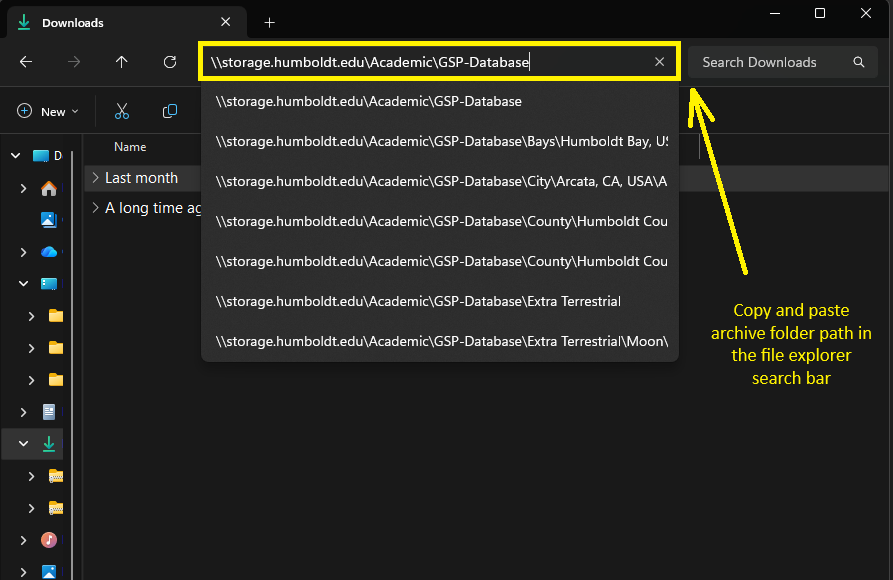
The archive is available as a folder within the CPH network at the following location:
\\storage.humboldt.edu\Academic\GSP-Database
To access the archive, just copy and paste this network path into the path text field in a folder view in MS-Windows or a browser.